

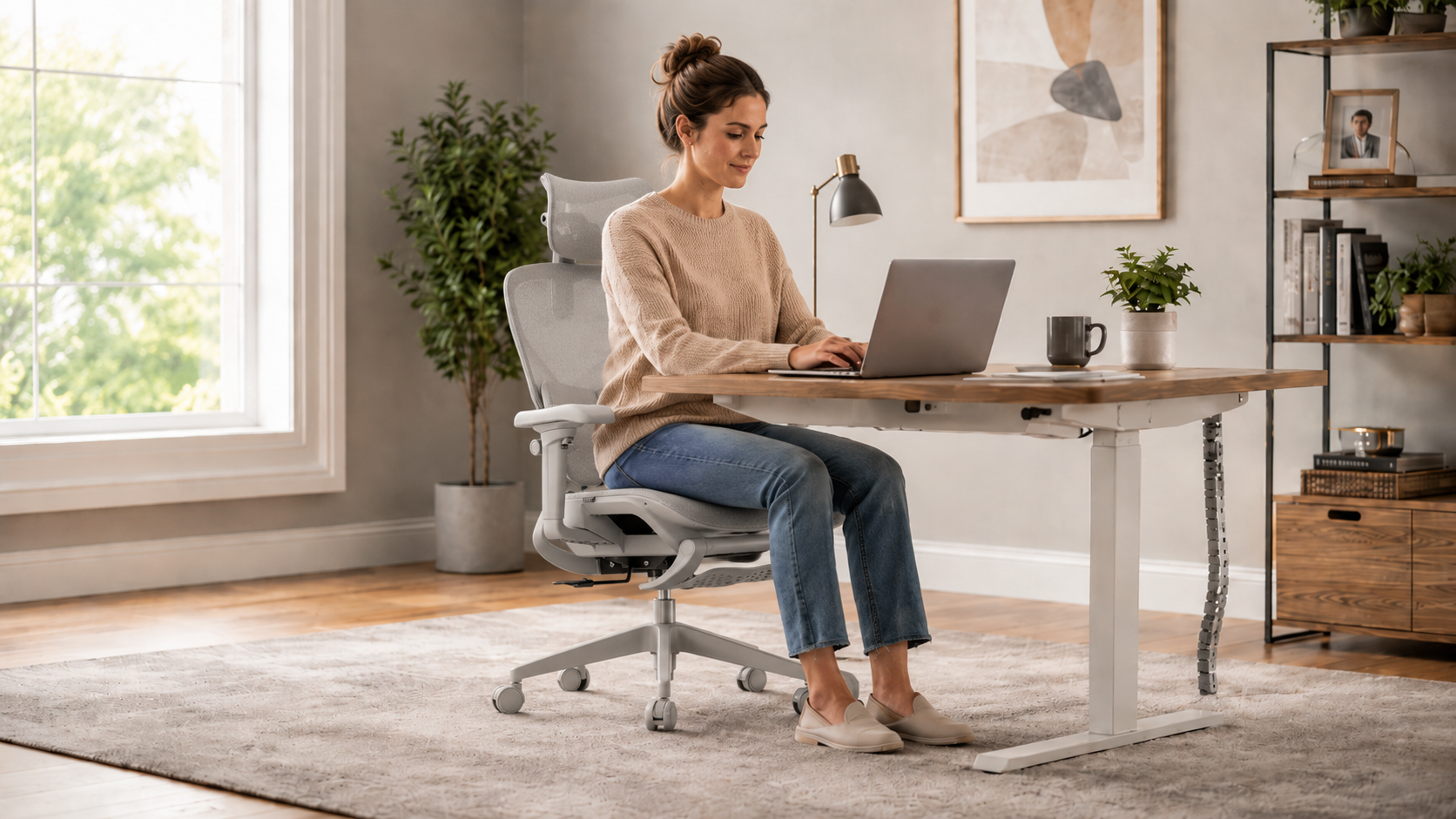
A home office chair is more than just a piece of furniture. If you work from home, study online, manage projects, take video calls, or spend long hours at a desk, your chair becomes part of your daily routine. The right ergonomic chair can help you sit more comfortably, stay better supported, and create a workspace that feels easier to use every day.
But with so many office chairs on the market, choosing the best ergonomic chair for your home office can feel confusing. Some chairs focus on soft cushioning. Some highlight mesh materials. Others promote lumbar support, recline, armrests, or footrests. The key is knowing which features actually matter for the way you sit and work.
This guide will help you understand what to look for when choosing an ergonomic office chair for your home workspace.
Why Your Home Office Chair Matters
Many people spend more time in their home office chair than they realize. A few emails can turn into hours of focused work. A short meeting can become a full day of calls, writing, planning, or computer tasks.
A basic chair may work for occasional use, but it may not provide enough support for long sitting hours. Over time, poor support can make your lower back, shoulders, neck, hips, or legs feel uncomfortable. This does not always happen immediately. It often builds up gradually during the workday.
A good ergonomic chair is designed to support your body while giving you the flexibility to adjust your sitting position. Instead of forcing you into one fixed posture, it helps your chair adapt to your body, your desk, and your daily routine.
Start with How You Actually Use Your Home Office
Before comparing chair features, think about your real sitting habits. The best ergonomic chair is not always the most expensive chair or the chair with the longest feature list. It is the chair that fits how you work.
Ask yourself a few simple questions:
- How many hours do I sit each day?
- Do I mostly type, write, draw, game, or take video calls?
- Do I sit upright most of the time, or do I often lean back?
- Do I need extra lower back support?
- Do I prefer breathable mesh or padded cushioning?
- Will more than one person use the chair?
- Do I want a chair for both focused work and relaxed breaks?
Your answers will help you choose a chair that supports your actual daily routine instead of just looking good in a product photo.
1. Look for Strong Lumbar Support
Lumbar support is one of the most important features in an ergonomic chair. The lumbar area is the lower part of your back, and it naturally curves inward. When a chair does not support this area properly, your lower back may feel unsupported during long sitting sessions.
A good home office chair should help support the natural curve of your spine. Some chairs have fixed lumbar support, while others offer adjustable or dynamic lumbar support.
Fixed lumbar support may work if the shape matches your body. Adjustable lumbar support gives you more control. Dynamic lumbar support can be even more flexible because it responds as your posture changes throughout the day.
If you work long hours, look for a chair that supports both upright sitting and relaxed leaning positions.
2. Choose Adjustable Seat Height
Seat height affects your entire sitting posture. If your chair is too high, your feet may not rest comfortably on the floor. If it is too low, your knees and hips may not align naturally with your desk.
A good ergonomic office chair should allow you to adjust the seat height so your feet can rest flat on the floor, your knees stay at a comfortable angle, and your arms can reach the desk without raising your shoulders.
This is especially important for home offices because desk heights can vary. Some people work at a standard desk, while others use dining tables, standing desks, or compact workstations.
3. Pay Attention to Seat Depth
Seat depth is one of the most overlooked features when choosing an ergonomic chair. It refers to the distance from the front edge of the seat to the backrest.
If the seat is too deep, the front edge may press against the back of your knees. If the seat is too shallow, your thighs may not receive enough support. Both situations can make long sitting sessions less comfortable.
An ergonomic chair with adjustable seat depth can better fit different leg lengths and sitting preferences. This is especially useful if more than one person may use the chair, or if you want a more customized sitting experience.
For home office users, adjustable seat depth can make the chair feel more personal and better suited for daily work.
4. Check the Armrest Adjustability
Armrests are not just an extra comfort feature. They help support your arms, shoulders, and upper body while you work.
If armrests are too high, your shoulders may feel tense. If they are too low, your arms may not receive enough support. If they are too far forward or too far apart, they may not match your typing position.
Adjustable armrests allow you to position your arms more naturally. This can be helpful when typing, using a mouse, reading, gaming, or switching between tasks.
For a home office chair, look for armrests that can at least move up and down. More advanced chairs may offer 3D or 4D armrests that move in multiple directions.
5. Consider a Reclining Backrest
Sitting upright all day is not always comfortable. A reclining backrest gives you more freedom to change posture during the day.
A good recline function allows you to lean back for short breaks, reading, thinking, or relaxed work. This can help make your home office chair feel more versatile.
When choosing a reclining ergonomic chair, look for stability and control. The chair should feel supportive when you lean back, not loose or unbalanced. A recline lock or tilt tension adjustment can also make the experience more comfortable.
For home office use, a recline feature is especially useful if your workspace also serves as a study area, creative space, or gaming setup.
6. Decide Between Mesh and Cushion
Material choice affects comfort, airflow, and the overall feel of the chair. Two common options are mesh and cushion.
Mesh ergonomic chairs are known for breathability. They allow air to pass through the backrest and sometimes the seat, helping reduce heat buildup during long sitting sessions. This can be useful if you work in a warm room or prefer a cooler sitting experience.
Cushioned chairs may feel softer at first. However, not all cushions provide long-term support. Some may flatten over time or trap heat during extended use.
If you want a cooler, more breathable chair for long workdays, a mesh ergonomic chair is often a strong choice. If you prefer a softer feel, choose a cushion chair with firm support rather than one that feels overly soft.
7. Make Sure the Chair Fits Your Body Size
A good ergonomic chair should fit your body. This includes your height, leg length, shoulder width, and sitting posture.
Check the chair’s recommended height range, weight capacity, seat width, seat depth, and backrest height. A chair that is too small may feel restrictive. A chair that is too large may not support you in the right places.
If you are taller, look for a higher backrest, adjustable headrest, and enough seat depth. If you are shorter, make sure the seat height can go low enough and the seat depth does not feel too long.
For shared home offices, adjustability becomes even more important because different users may need different settings.
8. Check Stability and Build Quality
Comfort is important, but stability is just as important. A home office chair should feel strong, balanced, and reliable during daily use.
Look for a stable base, smooth-rolling casters, strong armrests, and a reliable lift mechanism. If the product lists third-party testing or component certifications, that can help give you more confidence in the chair’s durability.
For example, BIFMA testing and SGS-tested components are often used in the office furniture industry to evaluate safety, strength, or performance standards. While certifications should not be the only factor, they can be useful indicators when comparing chairs.
9. Think About Your Desk Setup
Even the best ergonomic chair needs to work with your desk. Chair height, armrest height, desk height, monitor position, and keyboard placement all affect your sitting comfort.
Ideally, your monitor should be at a comfortable eye level, your keyboard and mouse should be easy to reach, and your arms should rest naturally while typing. Your chair should help you maintain this setup without forcing your shoulders, neck, or wrists into uncomfortable positions.
If your desk is too high, you may need a footrest. If your desk is too low, your armrests may need to be adjusted or lowered. The chair and desk should work together as one system.
10. Choose a Chair That Supports Movement
Ergonomics is not about sitting perfectly still. A good chair should support natural movement throughout the day.
During a normal workday, you may sit upright while typing, lean back while reading, turn slightly during calls, move closer to the desk, or relax during breaks. A chair that supports these movements can feel more comfortable than one that locks you into a single position.
Look for features such as recline, swivel, adjustable armrests, dynamic lumbar support, and smooth casters. These features help your chair respond to the way you actually work.
Common Mistakes When Choosing a Home Office Chair
One common mistake is choosing a chair only because it looks comfortable. A thick cushion or large backrest does not always mean better ergonomic support.
Another mistake is ignoring adjustability. A chair may look premium, but if it cannot adjust to your body, it may not feel comfortable after several hours.
A third mistake is buying only based on price. A low-cost chair may work for occasional use, but if you sit every day, support and durability become more important.
Finally, many people forget to consider their workspace. A chair that works well with one desk may not work as well with another. Always think about your chair, desk, monitor, and keyboard as one complete setup.
Quick Checklist: What to Look for in a Home Office Ergonomic Chair
- Supportive lumbar support for the lower back
- Adjustable seat height
- Adjustable seat depth for better leg support
- Adjustable armrests for typing and mouse use
- Stable reclining backrest
- Breathable mesh or supportive cushioning
- Strong base and smooth caster wheels
- Suitable height range and weight capacity
- Reliable build quality and tested components
- A design that fits your desk and daily routine
Is a Footrest Useful for a Home Office Chair?
A footrest can be useful if you like to change positions throughout the day or take short breaks between focused work sessions. Some ergonomic chairs include an extensible footrest that can be pulled out when you want a more relaxed sitting position.
A footrest is not necessary for everyone, but it can make a chair more versatile, especially if your home office also serves as a study, reading, or gaming space.
Final Thoughts
Choosing the best ergonomic chair for your home office is about more than finding a chair that looks comfortable. The right chair should support your lower back, adjust to your body, work with your desk, and help you stay comfortable during long sitting hours.
Focus on the features that directly affect daily comfort: lumbar support, seat height, seat depth, armrests, recline, breathable materials, and overall stability. A good ergonomic chair should make your home workspace feel easier, more supportive, and more adaptable.
If you are looking for an ergonomic mesh office chair with dynamic lumbar support, adjustable seat depth, flexible armrests, a reclining backrest, and an extensible footrest, OTO Zenpex is designed for long workdays, focused sessions, and comfortable home office use.

FAQ
What is the best ergonomic chair for a home office?
The best ergonomic chair for a home office is one that fits your body, supports your lower back, adjusts to your desk height, and remains comfortable during long sitting hours.
Is mesh or cushion better for a home office chair?
Mesh is often better for breathability and airflow, while cushion may feel softer. For long workdays, choose the material that gives you both support and comfort.
Why is adjustable seat depth important?
Adjustable seat depth helps the chair better match your leg length. It can improve thigh support and reduce pressure behind the knees.
Do I need lumbar support in a home office chair?
Yes, lumbar support is one of the most important features for long sitting hours because it helps support the natural curve of your lower back.
Is a reclining office chair good for working from home?
A reclining office chair can be useful for home office use because it allows you to change posture, lean back during breaks, and avoid sitting in one fixed position all day.
Ergonomic Chair vs Office Chair: What’s the Difference?
Not Every Ergonomic Chair Fits Everyone: How to Choose the Right Support for Your Body?